Production Switcher Outputs Explained: 12G-SDI PGM, AUX, Multiview, and UVC
A production switcher is only as capable as the outputs that connect it to cameras, monitors, recorders, and streaming software. Selecting one for multi-camera live production is largely a decision about output architecture. This guide walks through the output set on the TCHD-840 Super—two 12G-SDI program outputs, two 12G-SDI aux outputs, a 3G-SDI program down-convert, an HDMI 2.0 program output, a DisplayPort multiview, a UVC streaming output, plus RS422, RJ45, TALLY, and balanced audio I/O—and explains how each output changes the way a studio actually operates.
What the Output Specification Actually Decides
The output specification of a production switcher answers three separate questions at once: how the finished program leaves the switcher, how operators inside the studio see what is going on, and how the program reaches streaming and recording software. A switcher can carry the full internal processing engine and still fail in a real installation if its outputs do not physically match the monitors, recorders, and computers on site.
For multi-camera live production the outputs usually serve five distinct destinations:
- Program distribution to a broadcast server, transmitter, recording deck, or live venue screen.
- Auxiliary feeds for confidence monitors, green rooms, overflow screens, and backup recorders.
- Multiview for the director and technical operators inside the control room.
- Streaming and recording through HDMI capture, UVC, or direct network protocols.
- Control of cameras, Tally lights, and PTZ movement over RS422 and RJ45.
Each destination accepts different connector types, different signal levels, and often a different resolution from its neighbor. That mismatch is why the output matrix—not just the number of inputs—should drive the selection of a production switcher during evaluation.
Why 4K Workflows Are Pushing SDI Output Decisions Forward
The industry move from 1080p to 4K has reshaped the connector picture. A 12G-SDI link built to SMPTE ST 2082 carries uncompressed 4K at 60fps over a single coaxial cable at a data rate of 11.88 Gbps, which preserves the SDI advantages of locking connectors, long cable runs, and low latency. As a result, 12G-SDI remains the backbone of programs that leave the switcher for a broadcast server or master control, while HDMI 2.0 and USB have become the practical bridge to monitors, laptops, and streaming software.
Market tracking reflects that same direction. Research published for the production switcher category places the 2025 global market at approximately USD 2,596.79 million, with IP-based broadcasting and multi-camera streaming cited as the primary drivers. For a buyer in the evaluation stage, the practical consequence is that any switcher purchased today should expose at least one full-bandwidth SDI path, one consumer-facing HDMI path for displays or capture, and a streaming path that does not require an extra capture box.
TCHD Video has been building video hardware since 2005 and lists production switchers alongside live streaming cameras, capture cards, converters, and encoders among its main product lines. The company's exports represent roughly 20% of total sales, with its main markets in the EU, USA, and Asia. Its production switcher family is designed for the multi-camera workflows that sit behind conference, education, and live broadcast productions.
TCHD-840 Super Output Architecture, Connector by Connector
The TCHD-840 Super is organized around the idea that a single switcher should speak to the broadcast side, the operator side, and the streaming side without an external converter for each. The full output set is broken down below.
2× 12G-SDI Program Output
Two independent 12G-SDI program outputs carry the finished program feed. The duplicate path lets a studio send the same 4K program signal to two destinations at once—for example, a primary broadcast server and a redundant recorder, or a main transmitter and a 12G-SDI confidence monitor at the back of the control room. In an installation where a single program feed would otherwise require an external distribution amplifier, the second output removes a component from the rack.
2× 12G-SDI Aux Output
Aux outputs are the flexible path inside the switcher. Each aux output can be assigned to a different source than the program feed, which makes it useful for a green-room monitor, a presenter confidence screen, a director's preview display, or a backup recorder capturing a single isolated camera. On a production with limited control-room space, the two aux outputs can absorb several monitoring needs that would otherwise justify a separate router.
1× 3G-SDI Program Down-Convert
Many studios still own HD-only equipment: prompt monitors, older SDI recording decks, and HD broadcast encoders. Rather than forcing those devices into a separate conversion step, the TCHD-840 Super provides a dedicated 3G-SDI program output that down-converts the main program to the HD-SDI side of the workflow. The result is a single switcher that feeds 4K and HD destinations at the same time without an external down-converter, which shortens the signal chain and reduces points of failure.
1× HDMI 2.0 Program Output
The HDMI 2.0 program output covers the display-and-capture side of the studio. Large HDMI monitors, projectors, venue screens, and consumer-grade capture cards all connect through this output. In rooms where a dedicated streaming PC still uses an HDMI capture card rather than a UVC device, the HDMI 2.0 output gives that capture card a clean program feed while the SDI outputs continue to serve the broadcast path.
1× DisplayPort Multiview Output
The DisplayPort output is dedicated to the multiview display in the control room. Keeping multiview on its own output means the operator can see all camera sources, the program feed, and the preview feed simultaneously without consuming an SDI or HDMI program output for monitoring. For small productions operated by a single director, multiview on DisplayPort makes a compact control desk possible with one computer monitor instead of a wall of displays.
1× UVC Output: Driver-Free Webcam for Streaming and Recording
The UVC output is the part of the TCHD-840 Super that most directly changes how a studio streams. UVC (USB Video Class) is a standard protocol that lets a USB device identify itself to an operating system as a video capture device. When the switcher is connected over USB, the host computer—Windows, macOS, or Linux—enumerates the switcher as an ordinary webcam. No driver installation, no capture card, and no PCIe slot are required.
The practical effect is that streaming and recording software sees the switcher exactly the way it would see a USB webcam. OBS Studio, vMix, Zoom, and other UVC-compatible applications can select the switcher as a video source and receive the program feed directly. This is useful in three situations:
- Laptop-based streaming kits where an internal capture card is not available.
- Compact control rooms where the streaming PC is also the multiview workstation.
- Installations where adding an HDMI capture card would introduce an extra driver, an extra connector, and an extra point of failure.
The limitation to plan around is bandwidth. UVC is a USB-class protocol, so the available resolution and frame rate depend on the USB link and the host controller. For most live streaming platforms the resulting image is well matched to the platform's own ingestion, but studios pushing the highest UVC resolution should confirm USB host capability before committing to the workflow.
TALLY, RS422, and RJ45 Control Outputs
The control outputs complete the operational picture. TALLY drives the red and green lights that tell camera operators and presenters which source is live. RS422 is a serial control path for PTZ cameras, so the switcher can trigger preset recalls and camera movements as part of a production. RJ45 provides a network connection for IP-based control and integration with the broader studio infrastructure. Together the three control paths let the switcher act as the center of the room rather than as a single isolated device.
Balanced Audio I/O
Audio is often the part of a switcher that receives the least attention during evaluation and causes the most trouble during production. Balanced audio I/O uses a differential signal that rejects the electrical noise a long cable run would otherwise pick up, which matters in studios where audio cables share a rack with power distribution and video cabling. With balanced inputs and outputs on the switcher, the audio feed from a mixing console can be embedded into the SDI, HDMI, and UVC outputs so that every destination receives the same synchronized program.
Step-by-Step: Specifying a Multi-Camera Output Plan
A production switcher output plan is easier to specify in a fixed order, from the most demanding destination down to the least. The seven steps below reflect how a live studio is usually cabled on the TCHD-840 Super.
- List every destination. Write down every device that must receive a signal: broadcast servers, transmitters, recording decks, monitors, projectors, streaming computers, green-room displays, and Tally lights. Group them by connector family.
- Assign the 12G-SDI PGM pair. Reserve the two 12G-SDI program outputs for the highest-quality destinations first: the broadcast server and the primary recorder, or the transmitter and the master confidence monitor. Duplicate coverage comes from the second output rather than from a distribution amplifier.
- Assign the 12G-SDI AUX pair. Route the two aux outputs to the non-program destinations: a presenter confidence monitor, a green-room screen, a recorder capturing an isolated camera, or a spillover display in the venue.
- Use the 3G-SDI down-convert for HD legacy. Send the 3G-SDI program output to any device that cannot accept a 12G-SDI signal, such as an HD prompt monitor or an older HD recorder. This keeps the 12G-SDI outputs free for 4K destinations.
- Connect HDMI 2.0 to the display side. Use the HDMI 2.0 program output for the large HDMI monitor, projector, venue screen, or HDMI capture card. It is the connector most likely to match off-the-shelf equipment on site.
- Dedicate DisplayPort to multiview. Set the DisplayPort output to multiview so the director and technical operator see all camera inputs, PGM, and PVW on a single monitor without using any of the SDI or HDMI outputs for monitoring.
- Connect UVC for streaming and recording. Run a USB cable from the switcher to the streaming or recording computer. The operating system recognizes the switcher as a UVC webcam, and the streaming application (for example OBS Studio or vMix) selects it as a video source without installing a driver.
- Wire control last. Confirm the Tally signal reaches every camera position, that RS422 reaches the PTZ cameras, and that the RJ45 connection reaches the network switch used for IP control.
Running the steps in this order avoids the most common outcome in a new studio build: the switcher arrives with enough outputs, but the highest-quality path is occupied by a monitor and the streaming PC ends up on the weakest connector.
Where the Output Set Fits Real Production Scenarios
The same output architecture serves very different rooms. The scenarios below are common ways the TCHD-840 Super output set maps onto real installations.
Church and Worship Streaming
A multi-camera worship service typically uses three or four cameras, one confidence monitor for the pastor, one multiview for the volunteer director, and one streaming output. The 12G-SDI PGM feeds the in-house recording, the 3G-SDI down-convert feeds the pastor's confidence monitor, the DisplayPort output feeds the volunteer's multiview display, and the UVC output feeds the streaming laptop running OBS. Because UVC is driver-free, a new volunteer can operate the stream after a short handover rather than a driver installation.
Campus Television and Lecture Capture
A campus TV station or lecture capture room often has a fixed HD-only display infrastructure. The 12G-SDI PGM pair feeds the campus broadcast server and a backup recorder, while the 3G-SDI down-convert feeds the HD display in the lecture hall and the UVC output feeds the lecture recording software on the instructor's workstation. The HDMI 2.0 output can feed a projector when the room is also used for live events.
E-Commerce and Vertical Portrait Lives
Live commerce productions often run on a compact desk with two cameras, a graphics PC, and a streaming workstation. The HDMI 2.0 output feeds the on-set product display, the DisplayPort output gives the host or operator a multiview of the sources, and the UVC output feeds the multi-platform streaming software. Balanced audio I/O accepts the feed from the studio audio mixer so the embedded audio on the streaming platform stays in sync with the picture.
Concert, Sports, and Esports Venue Production
Venue productions need the program feed on the big screen, on a broadcast feed, and on a recording deck at the same time. The two 12G-SDI PGM outputs and the two 12G-SDI AUX outputs split those destinations across the switcher without external routing equipment, while the 3G-SDI down-convert handles HD-only house displays and the DisplayPort multiview keeps the operator aware of all camera sources. Tally and RS422 keep the PTZ operators and the camera crew synchronized with the switcher.
Surgical Live-Demo and Smart Classroom
Medical live-demo rooms and smart classrooms rely on a reliable program feed to lecture halls, recording systems, and remote participants. The 12G-SDI PGM pair covers the HD-SDI recording and a second-stage encoder, the 3G-SDI down-convert feeds the lecture hall display, and the UVC output feeds the remote teaching platform. Because UVC works without a driver, a technician can move the switcher between rooms without reconfiguring the receiving computer.
TCHD-840 Super Output Comparison at a Glance
The table below compares each output from the guide above by connector, primary role, typical destination, and the main consideration when planning a studio build.
| Output | Primary role | Typical destination | Planning consideration |
|---|---|---|---|
| 2× 12G-SDI PGM | Primary program feed | Broadcast server, transmitter, primary recorder | Duplicate output covers redundancy without an external DA |
| 2× 12G-SDI AUX | Flexible source routing | Confidence monitors, green room, backup recorder, ISO record | Assign to a different source than the program feed |
| 1× 3G-SDI PGM down-convert | HD-SDI program path | HD prompt monitor, HD recorder, HD encoder | Removes the need for an external down-converter |
| 1× HDMI 2.0 PGM | Consumer display and capture path | HDMI monitor, projector, venue screen, HDMI capture card | Matches most off-the-shelf equipment on site |
| 1× DisplayPort multiview | Operator monitoring | Director multiview display | Keeps SDI/HDMI outputs free for program distribution |
| 1× UVC | Driver-free streaming and recording | OBS, vMix, Zoom, and other UVC-compatible applications | No capture card, no driver install; USB bandwidth limits top resolution |
| TALLY | On-air signaling | Camera positions, presenter floor monitors | Confirm Tally cabling reaches every camera position |
| RS422 | Serial camera control | PTZ cameras | Supports preset recalls for shots and movement |
| RJ45 | Network and IP control | Studio network switch, control system | Keep on the same VLAN as the control system |
| Balanced audio I/O | Analog audio embed and de-embed | Mixing console, amplifier, monitor speakers | Differential signal rejects electrical noise over long runs |
FAQ
Is TCHD Video certified for compliance when purchasing a production switcher?
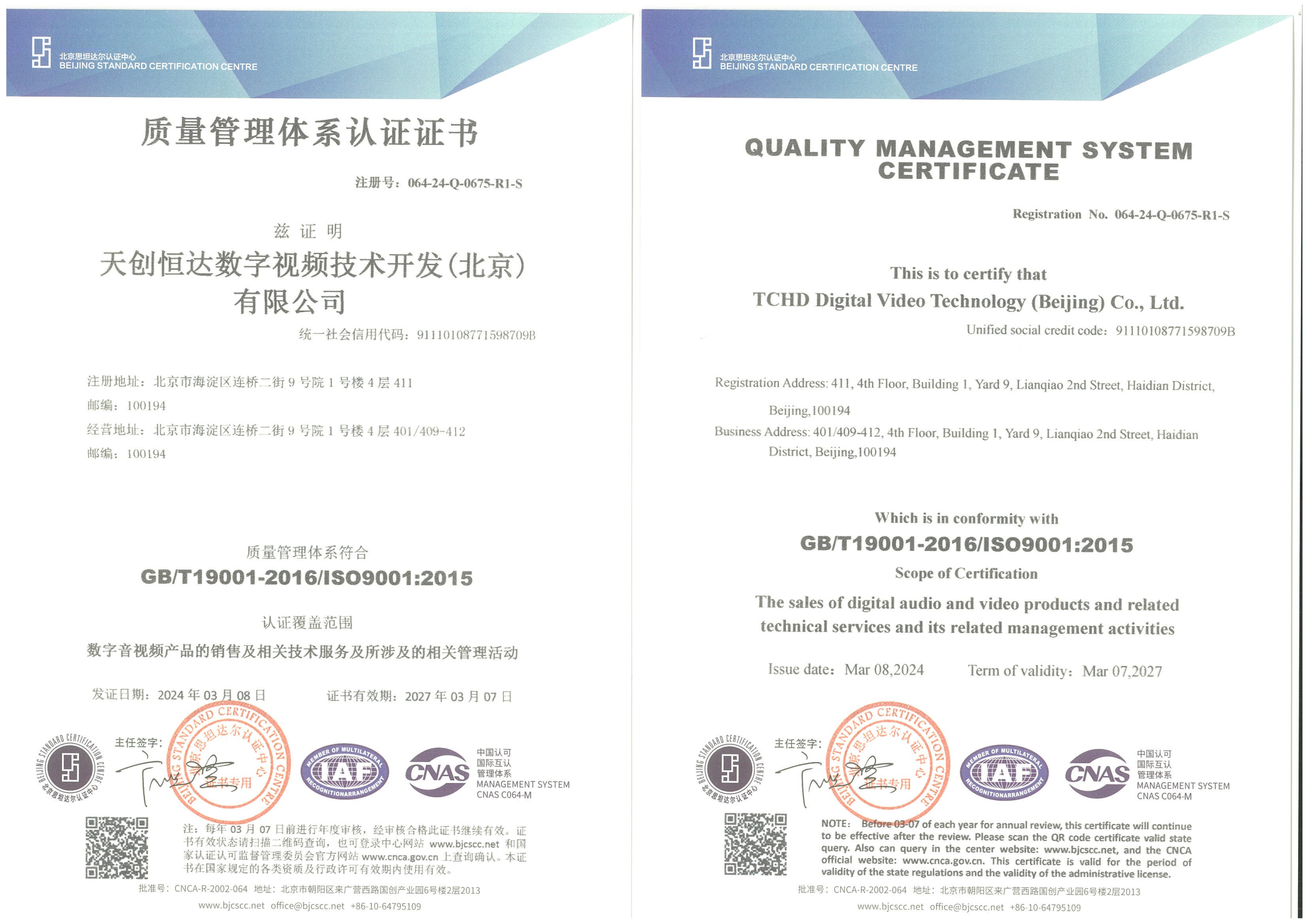
TCHD Video holds ISO 9001 (064-24-Q-0675-R1-S), ISO 14001 (064-24-E-0676-R1-S), and ISO 45001 (064-24-S-0677-R1-S) certification, all issued by BEIJING STANDARD CERTIFICATION CENTRE and valid through 2027-03-07, with scope covering the sales of digital audio and video products and related technical services. In addition, the CE EMC certificate LCSA07075157E was issued by LCS TESTING LABORATORY for the TC-400N4 HDMI series capture card under standards EN 55032:2015/A1:2020 and EN 55035:2017/A11:2020, and the applicable product list includes the TCHD-T3, TC420, and TC-980S live streaming cameras. Buyers should confirm which certificate applies to their specific model in the purchase order.
Does the UVC output on the TCHD-840 Super work without a driver?
Yes. UVC is a standard USB Video Class protocol, so when the TCHD-840 Super is connected by USB the host operating system—Windows, macOS, or Linux—enumerates it as an ordinary video capture device. Streaming and recording software such as OBS Studio, vMix, and Zoom selects it as a camera source without installing a manufacturer driver. No capture card and no PCIe slot are required. The practical ceiling on resolution and frame rate is set by the USB link and host controller rather than by the switcher.
What drives the cost of a production switcher in this output class?
Pricing is not published for the TCHD-840 Super, but the factors that typically drive the cost of a switcher in this output class are consistent: the number and bandwidth of SDI outputs (12G-SDI outputs carry more expensive silicon than 3G-SDI); the presence of a dedicated multiview path; the supported audio architecture, including balanced connectors; the control stack (TALLY, RS422, RJ45); and the number of simultaneous streaming paths. Because 12G-SDI is defined in SMPTE ST 2082 at 11.88 Gbps, the 12G-SDI PGM and AUX outputs typically represent a substantial share of the bill of materials. Buyers comparing quotes should match the output list line by line rather than comparing a headline unit price.
How can I evaluate a TCHD-840 Super unit before purchase?
Evaluation is best done with a sample unit tested against the actual studio destinations. Bring the production's real monitors, recorder, streaming laptop, and control hardware and confirm each output reaches its destination with no external converter. For teams in the EU, USA, or Asia—the three main markets TCHD Video serves—sample arrangement and technical support can be requested directly through the company's contact channels, and the full product catalog (TCHD Product Catalog 2025) is available for download.
Which output should handle streaming versus recording?
Streaming and recording serve different quality goals, so they should generally not share a single output. The most common arrangement on the TCHD-840 Super is: UVC to the streaming computer for driver-free multi-platform delivery, one 12G-SDI PGM output to a dedicated recording deck for the master file, and the HDMI 2.0 output to a display or secondary recorder. When the recording deck is HD-only, the 3G-SDI down-convert provides a clean HD program feed while the 12G-SDI outputs stay reserved for 4K destinations.
Plan your output architecture around your studio, not the datasheet
TCHD Video supplies a sample of the TCHD-840 Super and technical support for studios running multi-camera live production. Contact the team to arrange a sample, request a quote, or download the TCHD Product Catalog 2025.
Email: tomzhang@tchdvideo.com | Tel: +86-13910334207 | WhatsApp: +86 19498872019
Conclusion
Output architecture is the part of a production switcher specification that most directly determines whether a studio can deploy the switcher as received. The TCHD-840 Super addresses the three signal worlds a live production actually lives in: the 12G-SDI backbone that carries the program and aux feeds to broadcast and recording gear, the mixed SDI/HDMI/DisplayPort layer that drives monitors, projectors, and multiview, and the UVC layer that connects the switcher to streaming and recording software without a driver or a capture card. Balanced audio I/O, TALLY, RS422, and RJ45 complete the picture by keeping audio, signaling, and control synchronized with the picture.
Buyers evaluating a production switcher for multi-camera production should treat the output list as the primary comparison axis: how many high-bandwidth SDI outputs remain free after monitoring, whether an HD-SDI down-convert is built in, whether multiview has its own path, and whether the streaming output is driver-free. A switcher that satisfies all four on the day of installation will not need a converter in the rack, a driver on the streaming PC, or an emergency cable swap on the first live show.
Have Questions or Need More Details?
Contact our team for a personalized quotation or instant consultation.
Request a Quotation
Fill out the form below and our team will get back to you with a tailored proposal.
WhatsApp Direct Chat
Prefer to chat in real-time? Message us on WhatsApp for instant assistance & quick answers.
- Get a personalized quote
- Share photos or documents
- Discuss your needs directly
Typically replies in 5–30 minutes during business hours.