
Production Switcher Application Guide: Slow-Motion Replay for Sports and Event Broadcasts
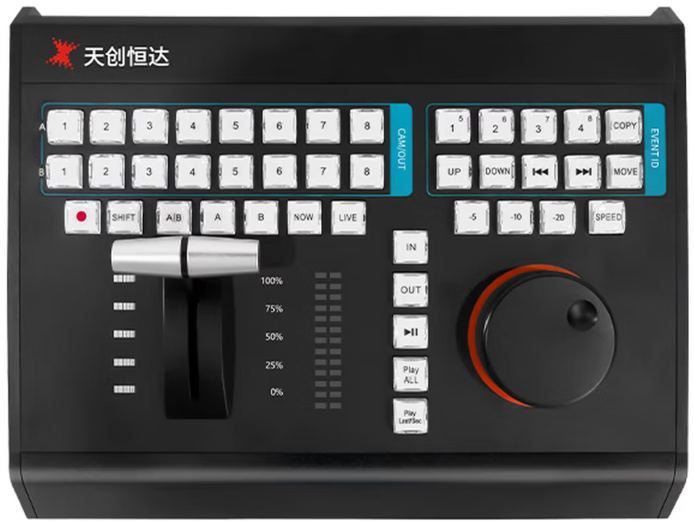
Slow-motion replay is often written into a switcher specification as if it were a single feature. In a working gallery it is a workflow built from two separate layers: a physical control surface that lets an operator mark and replay a moment under time pressure, and a switching core that can accept, process and output the camera formats the replay depends on. Projects that buy only one of those layers usually end up with replay capability that exists on the specification sheet but is awkward to use live.
This application guide explains how to adapt a production switcher project for sports replay and event broadcast work. It uses two TCHD Video products as reference points: the TC-UV08 slow-motion playback keyboard switcher, a 42-key broadcast control panel, and the TCHD-840 Super, a 4K60 live production switcher with 12G-SDI or HDMI 2.0 inputs. TCHD Video is a Beijing-based video hardware manufacturer established in 2005 whose product range includes live streaming cameras, video capture cards, converters, encoders and video switchers. The guide covers where each layer belongs, which specifications actually decide whether replay works, and which questions should be settled before purchase.
The Replay Problem: Three Decisions That Are Usually Made Separately
Replay failures in live sport rarely come from a missing feature. They come from three decisions that were made by different people at different stages of the project and never reconciled.
The first is the operator interface decision. If replay is controlled by a mouse, a keyboard shortcut set or a software panel on a general-purpose computer, the operator's reaction time is limited by the interface, not by skill. Marking a moment, stepping back five seconds, checking a second angle and rolling the clip back to live all require repeatable physical actions under pressure. A control surface with dedicated keys and a search knob exists to make those actions consistent.
The second is the format decision. Replay material is only as good as the signal the switcher can take in. A project that shoots 2160P60 or 1080P60 and then specifies an input path that cannot carry that format will produce replay that is either down-converted or unavailable. This is why 12G-SDI and HDMI 2.0 input options appear in the same conversation as replay, and why the frame-rate list of the switching core matters as much as the replay software.
The third is the output and distribution decision. A replay clip is only useful if it can be routed to the programme output, an auxiliary feed, a streaming encoder and an on-site screen without re-cabling. Projects that treat outputs as an afterthought end up with an engineering workaround in the middle of a match.
- Replay control is provided by software only, with no dedicated key layout or search knob for frame marking.
- The switcher's input format list does not match the camera format list, particularly at 60p or in 4K.
- Programme, auxiliary, multiview and streaming outputs were not counted before the equipment list was frozen.
Industry Background: Why 60p and 12G-SDI Enter Replay Conversations
The production switcher category is in the middle of an IP and multi-camera transition. Precision Reports estimates the global production switcher market at USD 2,596.79 million in 2025, describing the category as driven by IP-based broadcasting and multi-camera streaming transitions. Published estimates vary considerably depending on whether a report counts production switchers narrowly or counts all video switching equipment, so market figures should be read as an indicator of direction rather than as a precise procurement benchmark.
The technical driver is easier to pin down. The 12G-SDI standard, SMPTE ST 2082, carries uncompressed 4K video at 60 frames per second over a single coaxial cable at a data rate of 11.88 Gbps. That single-cable 4K60 capability is what makes 12G-SDI relevant to replay projects: the same infrastructure that carries the live camera feed can carry the high frame-rate signal the replay operator needs to slow down without visible stepping.
The practical consequence for a project team is that the question is no longer only "does the switcher support replay software?" but "does the whole signal path support the frame rate that makes replay look acceptable?" A 2160P60 or 1080P60 production with a 12G-SDI or HDMI 2.0 input path and a hardware switcher core is a different proposition from a 1080i production with a software-only replay station.
For buyers in Asia Pacific, North America and Europe, the second-order effect is that replay is increasingly evaluated as a project capability rather than as an accessory. That moves the decision earlier: into the input/output count, the frame-rate list and the control position in the gallery layout, rather than into a post-purchase add-on.
The Solution: Separate the Control Layer from the Switching Core
The cleanest way to adapt a production switcher project for replay is to stop looking for one device that does everything and instead define two layers with explicit responsibilities. The TC-UV08 covers the control layer. The TCHD-840 Super covers the switching and format layer. Both are TCHD Video products, but they are specified against different requirements and should be evaluated separately.
The control layer: TC-UV08 slow-motion playback keyboard switcher
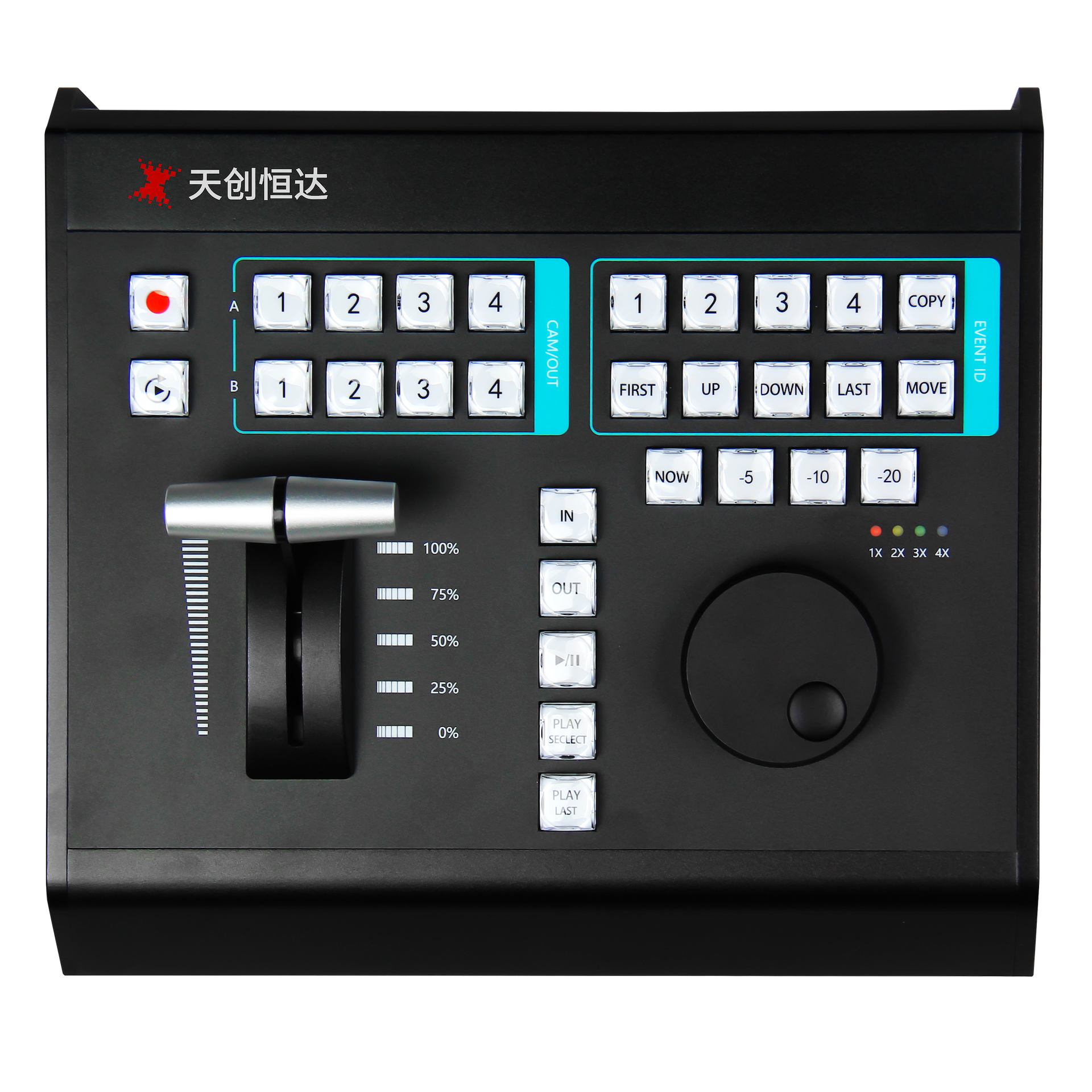
The TC-UV08 is a professional broadcast control panel built around 42 dual-color crystal transparent keys and 8-channel multi-function shortcut keys. It supports broadcast-grade A/B multi-camera switching and one-touch event operation. In a replay workflow, that A/B structure is the part operators notice first: the panel is arranged so that switching between camera angles and triggering replay events does not require navigating a menu.
Frame control is handled by a third-generation damping search knob and a streamlined photoelectric T-bar, which support precise playback speed adjustment and accurate timeline positioning. Independent −5s, −10s and −20s quick mark buttons, together with NOW and LIVE shortcuts, are designed for fast frame capture and smooth slow-motion replay — the sequence an operator actually performs when a scoring moment needs to be replayed within seconds.
On the connectivity side, the panel supports MIDI, USB, RS232 and LAN communication protocols for two-way data interaction, and is stated as compatible with mainstream live software including vMix, FairPlay and TCLiveSP. The enclosure is CNC-machined aluminium alloy, chosen for structural rigidity, scratch resistance and heat dissipation during long studio sessions, and the all-in-one USB design carries both power and bidirectional communication over one cable, which simplifies gallery wiring. The key layout is ergonomically arranged to reduce wrist fatigue during long intensive operating periods, and reserved expansion interfaces support customisation. TCHD Video states the panel's application areas as sports replay, event live broadcast, corporate conferences, education and professional content creation.
The switching core: TCHD-840 Super
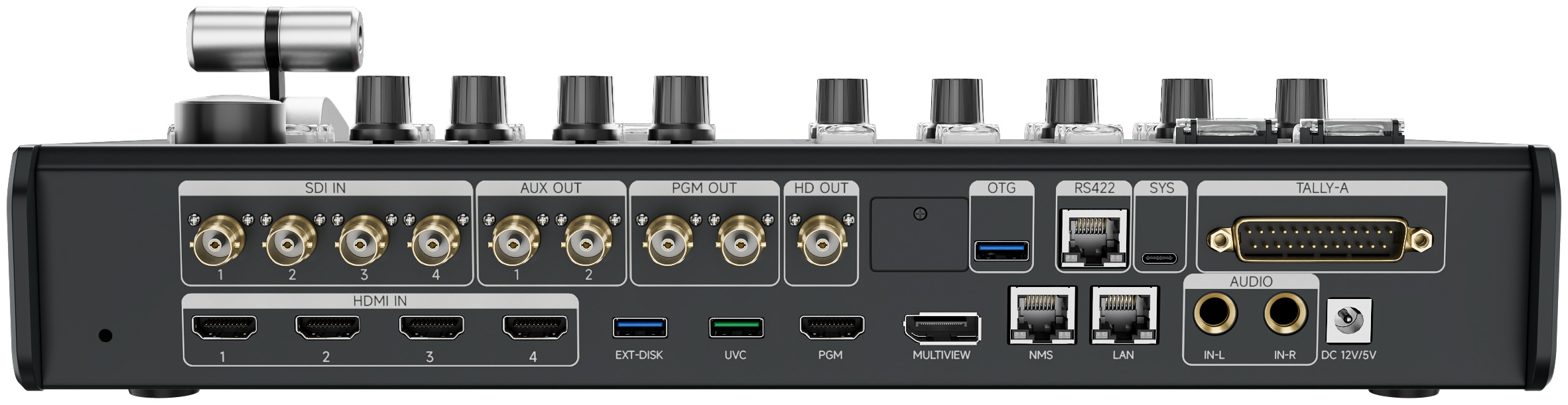
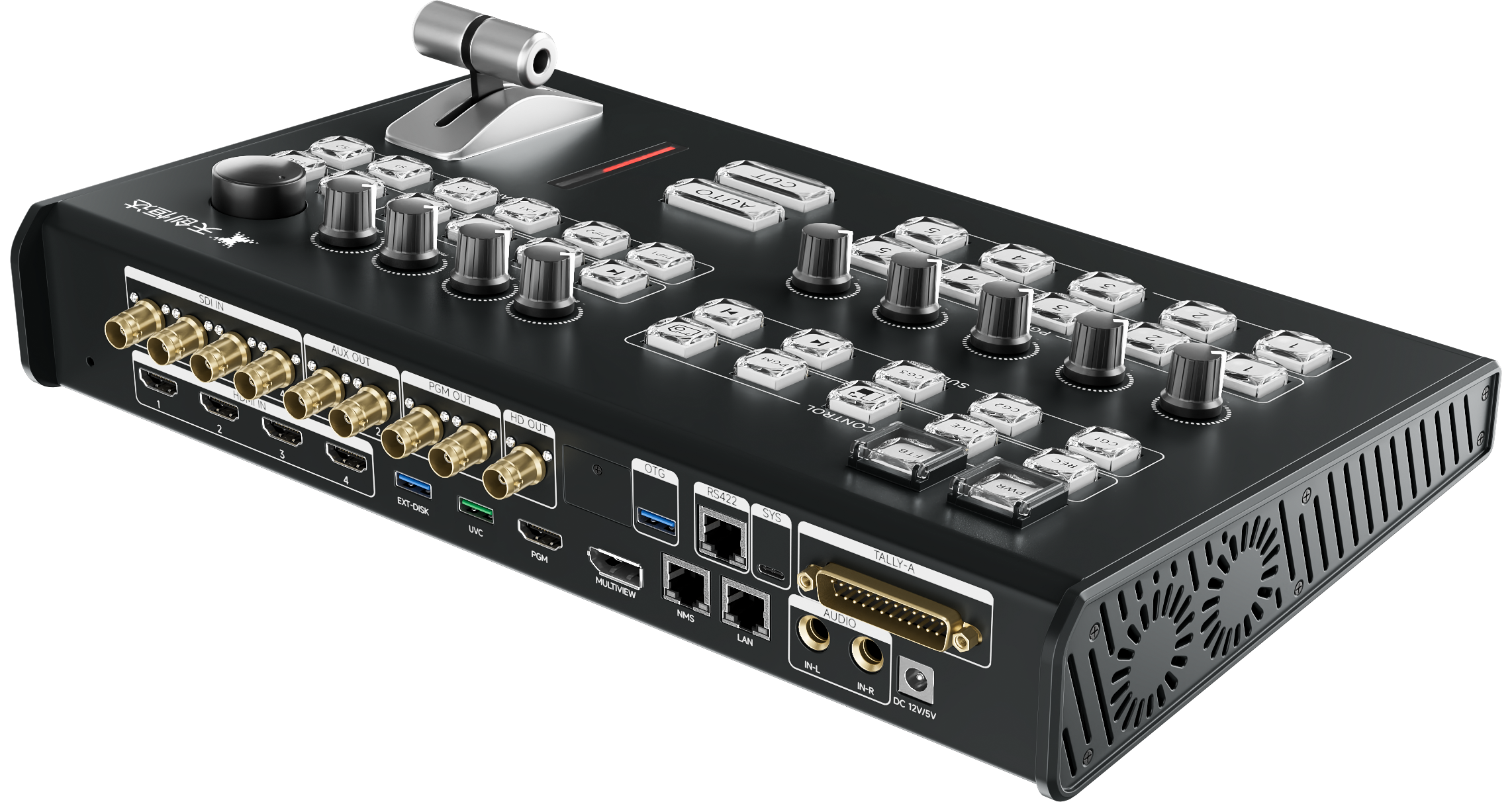
The TCHD-840 Super is the layer that decides whether the replay signal path is viable. It provides at least 4×12G-SDI inputs (compatible with 3G-SDI) or at least 4×HDMI 2.0 inputs, selectable at the project level, plus a balanced analogue audio input. Outputs include 2×12G-SDI programme, 2×12G-SDI auxiliary, 1×3G-SDI down-converted programme, 1×HDMI 2.0 programme, 1×DisplayPort multiview, 1×UVC and a balanced analogue audio output. Additional interfaces include RS422, two RJ45 ports, a TALLY port, an OTG port and USB 3.0, and the unit has a built-in M.2 slot.
Format coverage is stated as a full chain: 2160P60/59.94/50/30/29.97/25, 1080P60/59.94/50/30/29.97/25 and 1080i60/50. For replay work, the important part of that list is the presence of 2160P60 and 1080P60 at both input and output, because a slow-motion clip is only as smooth as the frame rate the switcher can carry end to end.
Beyond format handling, the core contributes several functions that matter during a live event: one-click switching between landscape 16:9 and portrait 9:16 production modes, one-click window snapshot capture, and a one-touch emergency function that routes the output to black or colour bars. PIP and multiview templates support single-, dual-, triple- and quad-window layouts, configurable through the web interface and touchscreen, with custom size, position and background image. Title templates support clocks, text, images and rolling captions, and the unit can be controlled remotely from a web browser for channel switching and title control. Streaming is handled by a built-in codec supporting RTMP, RTMPS, SRT, RTSP, UDP and NDI, with one-channel stream reception and four-channel simultaneous push to different platforms using template-managed URLs. UVC output means the switcher is recognised as a webcam by a connected computer, so a streaming or recording application can take the programme feed without an external capture card.
What the two layers cover — and what still has to be verified
Used together as a project concept, the two layers answer different questions. The control surface answers "how does the operator mark and replay a moment?" and the switching core answers "can the signal get in, be processed at the required frame rate, and be routed to every destination?" That division keeps the specification honest and makes it easier to replace or upgrade one layer without rebuilding the other.
One thing the product documentation does not do is guarantee that the TC-UV08 panel will control a specific third-party replay application in a specific way out of the box. The panel is stated as compatible with vMix, FairPlay and TCLiveSP over MIDI, USB, RS232 and LAN, but key mapping, T-bar behaviour and search-knob response must be validated against the exact software version and replay module used in the project. Treat that validation as a commissioning task, not an assumption.
Step-by-Step: Adapting a Switcher Project for Sports Replay
Step 1 — Define the replay deliverables before choosing hardware
List what the replay operator must be able to do: mark a moment, step back a fixed number of seconds, roll a clip at variable speed, return to live, and send the clip to a specific output. The −5s, −10s and −20s mark buttons and the NOW/LIVE shortcuts on the TC-UV08 map directly to those actions, so the deliverables list becomes the operator-function checklist rather than a generic feature list.
Step 2 — Fix the frame-rate family, then check the input path
Decide whether the production is 2160P60, 1080P60, 1080i or a mix, and then verify the switcher's stated format list against it. The TCHD-840 Super covers 2160P60 through 1080i60/50 on both input and output, with 12G-SDI (3G-SDI compatible) or HDMI 2.0 inputs selected at project level. If the venue's cameras are 12G-SDI and the replay server is HDMI-based, that selection decision has to be made once, not renegotiated on site.
Step 3 — Count every output before the equipment list is frozen
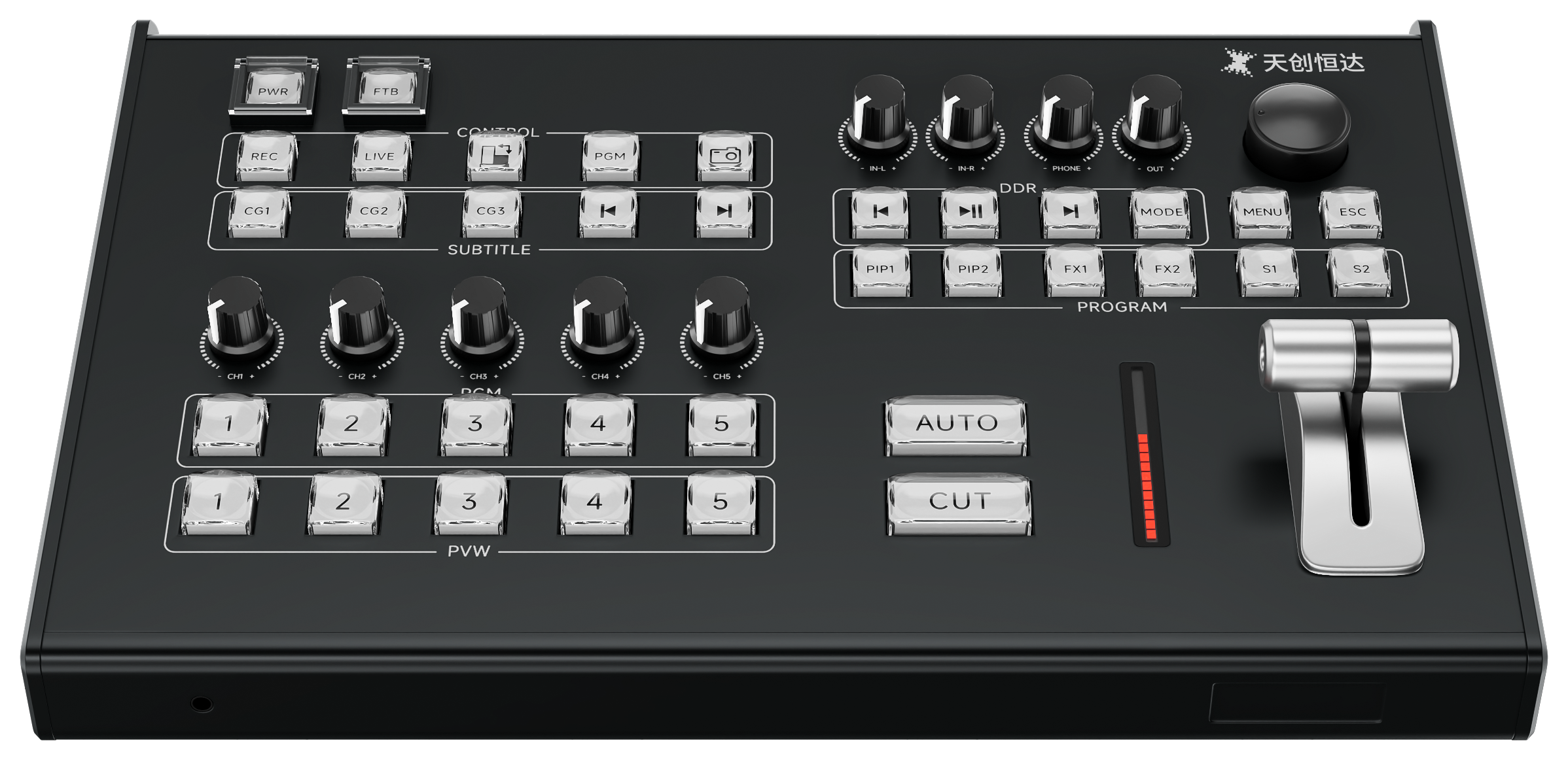
Replay usually needs more destinations than live production does: programme to the broadcast or stream path, an auxiliary feed to an in-venue screen, a multiview for the operator, and often a separate recording or UVC feed. The TCHD-840 Super provides 2×12G-SDI programme, 2×12G-SDI auxiliary, a 3G-SDI down-converted programme output, HDMI 2.0 programme, DisplayPort multiview and UVC. Mapping each destination to a physical output at planning stage prevents mid-event re-cabling.
Step 4 — Place the control surface where the operator actually sits
The TC-UV08 connects over a single USB cable that carries both power and bidirectional communication, which reduces cabling to the operator position. Because the panel is CNC aluminium and designed for long sessions, position it at a height and angle that allows sustained use of the search knob and T-bar rather than treating it as a desktop accessory.
Step 5 — Map and validate the software control layer
Configure the mapping between the panel and the replay software over the protocol you intend to use — MIDI, USB, RS232 or LAN. Confirm that the T-bar and search knob respond with the expected sensitivity, that the mark buttons trigger the intended offsets, and that the A/B camera switching behaves as the operator expects under load. Do this with the same software version that will run on match day.
Step 6 — Plan audio and synchronisation deliberately
Replay clips frequently reveal audio offset that live cutting hides. Plan the audio path through the balanced analogue input and output on the core, decide where delay compensation will be applied, and confirm the delay capability of the exact model and firmware. Do not assume that a specification from a different model in the same range applies.
Step 7 — Build the streaming and fallback plan
Decide which platforms receive the programme feed and whether replay clips need to reach them separately. The TCHD-840 Super supports one-channel stream reception and four-channel simultaneous push over RTMP, RTMPS, SRT, RTSP, UDP and NDI, with template-managed URLs. Add the emergency function to the operating procedure: a one-touch switch to black or colour bars, plus one-click snapshot capture for evidence and post-event review.
Use Cases: Where This Configuration Fits
Sports replay
This is the reference application. A/B multi-camera switching, dedicated mark buttons and a damping search knob let an operator move between angles and replay a moment at controlled speed while the live production continues on the main programme bus. Pairing the panel with a 2160P60 or 1080P60 switching core keeps the replay material at the frame rate the production was shot in.
Event live broadcast
Conferences, ceremonies and staged events benefit from the same mark-and-return discipline even when the replay is used for highlights rather than officiating. The photoelectric T-bar and event shortcut keys make cue-based operation repeatable across a multi-day programme.
Corporate conferences
Corporate productions typically combine live camera feeds, presentation sources and recorded content. The TC-UV08 is stated by TCHD Video as suitable for corporate conferences, and the TCHD-840 Super contributes PIP templates, title overlays with clocks and rolling captions, and portrait or landscape operation for organisations that publish to both formats.
Education and professional content creation
Lecture capture, demonstration recording and studio content production use the same control logic at lower tempo: mark a point, replay it, return to live. UVC output on the switching core allows a standard computer to receive the programme feed as a webcam source without an additional capture card, which keeps a teaching studio or content team's signal chain compact.
Comparison Table: Three TCHD Video Models Against Replay Requirements
The table below compares three TCHD Video switchers on the dimensions that decide whether a replay workflow is feasible. It uses only the published specification points for each model; where a point is not stated in the source documentation, the table says so rather than inferring a value.
| Requirement | TCHD-840 Super | TCHD-840 Pro | TCHD-812 Ultra |
|---|---|---|---|
| Input path | ≥4×12G-SDI (3G-SDI compatible) or ≥4×HDMI 2.0, selectable; ≥1 balanced audio input | 4-channel 4K HDMI and NDI hybrid input (1×4K60, 2×4K30, 4×1080P decoding) | 4×12G-SDI and 1×HDMI high-bandwidth inputs |
| Stated format coverage | 2160P60/59.94/50/30/29.97/25; 1080P60/59.94/50/30/29.97/25; 1080i60/50 | 4K60 supported through HDMI and NDI hybrid input; 1080P decoding modes listed | 4K@60Hz, 1080p and 1080i multi-frame-rate processing |
| Programme and auxiliary outputs | 2×12G-SDI PGM, 2×12G-SDI AUX, 1×3G-SDI down-convert, 1×HDMI 2.0 PGM, 1×DP multiview, 1×UVC | Type-C UVC output; dual Gigabit ports; TALLY linkage | UVC output; 12-channel audio mixer; dual hot-swap SSD slots |
| Streaming capability | RTMP/RTMPS/SRT/RTSP/UDP/NDI; 1-in, 4-out push with URL templates | RTMP/RTMPS/SRT/UDP/RTP/HLS/WHIP; 4-platform simultaneous streaming | RTMP/RTMPS/SRT/RTSP/NDI/GB28181; 4-platform simultaneous push |
| Recording / storage | Built-in M.2 slot | Multi-format segmented USB recording | Dual hot-swap SSD slots, optional 2TB/4TB/8TB |
| Replay-relevant note | Strongest fit when the project needs a 12G-SDI or HDMI 2.0 core with 2160P60/1080P60 end to end | Strongest fit when the camera estate is HDMI and NDI rather than SDI | Strongest fit when on-board high-bitrate recording and a large local screen are priorities |
None of the three models is described in its documentation as containing a built-in replay controller; in each case the replay control layer is a separate decision. The comparison therefore answers the format and routing half of the question. The operator-interface half is answered by the control surface selection, which is where the TC-UV08 enters the project.
FAQ
Either can work, but they are not interchangeable in every venue. SMPTE ST 2082, the 12G-SDI standard, carries uncompressed 4K at 60 fps over a single coaxial cable at 11.88 Gbps, which is why 12G-SDI is common in broadcast infrastructure where cable runs are long and BNC patching is standard. The TCHD-840 Super offers at least 4×12G-SDI inputs, compatible with 3G-SDI, or at least 4×HDMI 2.0 inputs, selectable at project level. The decision should follow the camera and infrastructure standard in the venue rather than a preference for one connector type.
The panel is specified with 42 dual-color crystal transparent keys, 8-channel multi-function shortcut keys, and broadcast-grade A/B multi-camera switching with one-touch event operation. Frame control uses a third-generation damping search knob and a streamlined photoelectric T-bar for playback speed adjustment and timeline positioning, supported by independent −5s, −10s and −20s quick mark buttons plus NOW and LIVE shortcuts. The panel communicates over MIDI, USB, RS232 and LAN and is stated as compatible with vMix, FairPlay and TCLiveSP. Exact key behaviour must be validated against the specific software version used in the project.
Cost is driven by four variables rather than by the control panel alone: the number and type of inputs on the switching core (12G-SDI and HDMI 2.0 configurations differ), the output count required by the venue, the recording and storage option chosen, and the replay software licences and operator training required. Because the control surface and the switching core are separate purchases, a project can phase them — for example by standardising the core first and adding dedicated control surfaces as the number of replay positions grows. No price figures are published in the specification documentation reviewed here, so budget figures should be requested per configuration.
Run a bench test with the actual replay software and the actual camera formats. Confirm that the switcher accepts the intended 2160P60 or 1080P60 signal on the chosen input type, that the panel's search knob, T-bar, mark buttons and A/B switching behave as the operator expects, and that programme, auxiliary, multiview and UVC outputs all reach their destinations. Buyers who want to evaluate the TC-UV08 against their own software stack can request current configuration details and evaluation arrangements through TCHD Video's contact channels before specifying a full gallery.
Replay equipment is usually tied to an immovable event date, so supply questions should be asked early and in writing: confirmed configuration, stated delivery schedule, and spare-unit policy for the event window. For context on supply capacity, TCHD Video was established in 2005, operates a 10,000 m² facility with 50 employees and a 10-engineer R&D team, and states an annual production capacity of approximately 4,000 units, with exports accounting for 20% of output and main markets in the EU, USA and Asia. Those figures describe manufacturing capacity; they are not a delivery commitment for a specific order, which should be confirmed directly with the supplier.
Conclusion
Adapting a production switcher project for slow-motion replay is less about finding a single replay-enabled box and more about splitting the requirement correctly. The operator layer needs physical keys, a damped search knob, a photoelectric T-bar and fixed mark offsets, which is the role the TC-UV08 is built for. The signal layer needs a stated frame-rate path — 2160P60 and 1080P60 in and out — plus enough programme, auxiliary, multiview and streaming outputs to reach every destination, which is the role the TCHD-840 Super fills with selectable 12G-SDI or HDMI 2.0 inputs.
Two checks keep the project honest. First, validate the control mapping against the exact replay software and version that will run on event day, because compatibility statements cover the protocol and software family, not every operating detail. Second, confirm the audio delay behaviour and the commercial terms of the exact model and firmware you intend to deploy rather than assuming they carry over from a neighbouring model in the range.
Handled that way, replay stops being a feature that appears on a datasheet and becomes an operating procedure the gallery can rehearse before the first match.
Next step: review the full TCHD Video range before finalising a replay configuration.
Download the TCHD Product Catalog 2025 (PDF) | www.tchdvideohk.com
Contact: Leo Chen · Email: tomzhang@tchdvideo.com · Tel: +86-13910334207 · WhatsApp: +86 19498872019
Address: Room#411, Building#1, Yard#9, Lianqiao 2nd street, Haidian district, Beijing, China
Have Questions or Need More Details?
Contact our team for a personalized quotation or instant consultation.
Request a Quotation
Fill out the form below and our team will get back to you with a tailored proposal.
WhatsApp Direct Chat
Prefer to chat in real-time? Message us on WhatsApp for instant assistance & quick answers.
- Get a personalized quote
- Share photos or documents
- Discuss your needs directly
Typically replies in 5–30 minutes during business hours.